Compact Android PDF toolkit for fast viewing and conversions
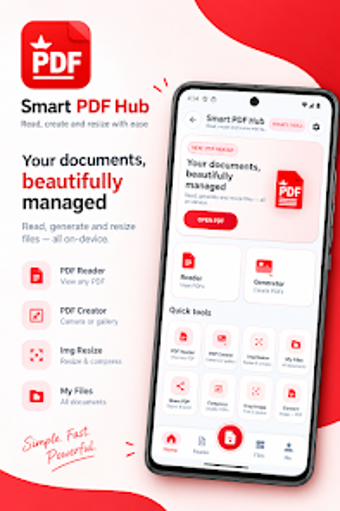
Smart pdf hub from Idea Clan is an Android document utility designed to manage PDFs on mobile devices, focused on viewing, conversion, and basic document assembly. The app provides high-speed PDF rendering, image-to-PDF conversion, merge tools, and multiple viewing modes to shape readable output. With Night Mode and a small APK footprint, it targets students and professionals who need quick, offline document handling on standard Android hardware.
What the app is and the professional problems it addresses
Smart pdf hub is a pocket PDF workstation that targets on-the-go document workflows by combining viewing and light conversion. It handles PDF rendering with "smooth scrolling and navigation," so users who need to read reports or reference material away from desktop environments can do so without switching apps. The inclusion of image-to-PDF conversion makes it practical for digitizing receipts, notes, and IDs directly from a mobile camera.
How it fits into a typical mobile document workflow
The app supports a concise production flow: capture images, convert to PDF, then merge snapshots into a single document for sharing or archival. Merge functionality and image conversion let someone compiling expense bundles or lecture notes assemble a final PDF without desktop tools. Multiple viewing modes, including Continuous Scroll and Page-by-Page, help users check pagination and layout before export.
Usability, onboarding, and required user knowledge
The interface emphasizes speed and low friction, reflected in the lightweight APK size of roughly 5.6–9 MB. That small footprint reduces installation friction on varied Android devices and limits resource overhead during reading sessions. Night Mode provides a low-light reading option, which suits extended review tasks; minimal training is needed for basic capture and merge operations.
Compatibility, offline use, and performance under load
Designed for Android, the app functions without an active internet connection, so document management continues in offline situations. The lightweight design targets performance across standard mobile hardware, trading advanced annotation or enterprise sync for fast rendering and quick conversions. For users who need cloud collaboration or extensive editing, the app’s local-first approach is the main operational constraint.
Recommendation: a pragmatic mobile PDF utility for quick, local document tasks
Smart pdf hub is a practical choice for students and professionals who need fast, offline PDF viewing and image-based document assembly on Android devices. It favors speed and a small install size over advanced editing or cloud collaboration, so it suits users prioritizing local capture and rapid compilation rather than integrated team workflows.